

 Instagram

 Shopify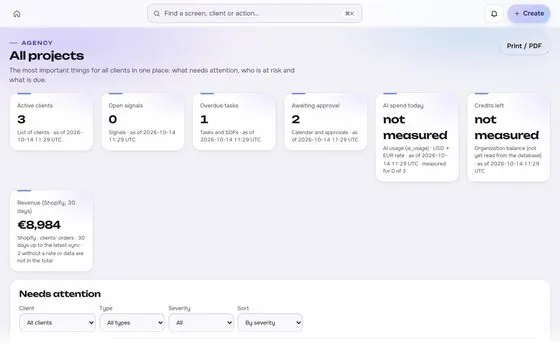






Pick the setup that looks like your week
ROASfinity is one workspace for the ads, the store, email, search and social of a business. The product is the same in every case. What changes is where the numbers come from, who works on the account and what goes wrong most often. These three pages start from that difference, so you can read the one that matches your situation and skip the rest.
- A Shopify store. You sell through Shopify and run ads on Meta and Google, alone or with a freelancer or an agency. The store holds the orders and refunds that decide whether the ads paid off. Read the Shopify stores page.
- A WooCommerce store. You sell through WooCommerce on a WordPress site. Taxes, shipping and plugins change what an order total means, so the definitions matter more than usual. Read the WooCommerce stores page.
- An agency with many clients. You run the accounts of several businesses at once. The risk is losing track of who approved which change and which client a number belongs to. Read the agencies with many clients page.
What is the same in every setup
Some rules do not depend on the store type. They are how ROASfinity works, and each setup page builds on them.
- Read-only first. Every connection starts by reading. Writing to an ad account, a store or a site is switched on later, per client, and only after the right roles are in place.
- Nothing changes without a yes. A budget, status or content change is proposed with its reason, shown as a before and after preview, approved by a person with the right role, sent once and then read back from the platform to confirm it landed. The steps are explained on the approvals page.
- Every number shows its source. A figure in a report carries where it came from, the formula and when it was last updated. When a source is missing, the report says "not measured" instead of showing a zero.
- Each client is its own room. Data, people and access are separated per client and checked on the server for every request. A person only sees the clients they are assigned to.
Which numbers each setup leans on
A store owner and an agency look at the same reports with different questions. Store owners usually start from MER (marketing efficiency ratio: store revenue divided by total ad spend) and from contribution margin, because both come from their own orders and costs. Agencies add a second layer: the same definitions applied in the same way to every client, so a review meeting compares like with like. The MER vs ROAS guide explains why the store figure and the platform figure differ and how to read them together.
How to start, whatever the setup
- Connect the store and the ad accounts read-only and compare a few days of orders and spend with what you see in the platforms themselves.
- Write down the definitions once: what counts as revenue, what counts as a new customer, and how refunds are treated.
- Agree who can approve a change before anyone proposes one.
- Only then switch on writing for the accounts where it saves time.